
When a Problem Refuses to Go Away, Sometimes the Best Solution Is to Build Your Own

For years, drone professionals have benefited immensely from extraordinary advances in aircraft technology. Drones have become smarter, lighter, safer and more capable. Cameras capture richer data. Batteries last longer. Processing engines transform imagery into highly detailed digital twins of the physical world.
Yet despite these advances, one problem has persisted in the background.
The workflow.
Mission planning has long been one of the persistent frustrations among drone mapping professionals, surveyors, GIS specialists and remote sensing specialists. The workflow often involves juggling between multiple software platforms, subscriptions, format conversions and compatibility issues that add unnecessary complexity to what should be a straightforward process.
The Frustration ….The Solution
For Salar Ghaffarian, creator of FlyPath, that frustration eventually became motivation. Instead of accepting the limitations of the existing workflow and mission planning tools, he chose instead to use what he knows best and build a solution inside QGIS, the world’s most widely used open-source Geographic Information System software.
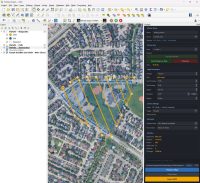
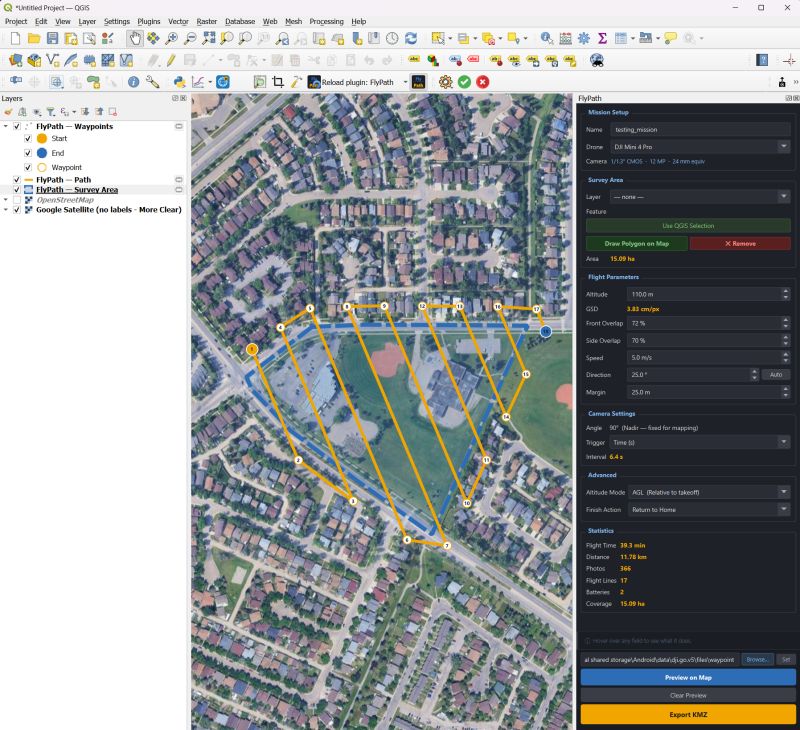
The result is FlyPath, a free and open-source QGIS plugin for DJI drone mission planning. According to the QGIS Plugin repository, FlyPath is described as a QGIS plugin that allows for planning of autonomous 2D drone mapping missions and exporting them in the native DJI WPML KMZ file and loading them directly in the DJI Fly app. It allows one to draw their survey area on a map, set flight altitude and overlap, preview the flight path, and export a ready-to-fly mission file.
Currently supported drones: DJI Mini 3 Pro, Mini 4 Pro.
Ever since its launch, the response has been remarkable, with over 300 downloads within the first month, even without formal marketing campaigns. In the crowded world of QGIS plugins, such a kind of organic adoption often signals one thing: a genuine problem has been solved.
The Bigger Issue in Drone Mapping
Many professionals still find themselves moving between disconnected systems simply to create a flight mission for themselves or even their teams remotely. Flight plans are often created in one environment, data collected, integrated, and analysed in another, with files converted through intermediary formats. Then everything must be tested to ensure compatibility with the final aircraft ecosystem.
For organizations managing dozens or hundreds of projects annually, these extra steps create inefficiencies that compound over time.FlyPath approaches the challenge differently. Instead of forcing users to leave QGIS, it brings mission planning directly into the environment where many GIS professionals already spend most of their working day.
The concept sounds obvious in hindsight. The best innovations often do.
Interview: A Conversation with FlyPath Creator Salar Ghaffarian
Our correspondent had a chance to chat with the creator of FlyPath, Salar Ghaffarian, to hear more from him on his awesome and game-changing plugin.

Salar Ghaffarian is a Geomatics Engineer, Geospatial Data Scientist and Advanced RPAS Pilot with over 6 years of wealth of experience applying machine learning and deep learning techniques to remote sensing and geospatial datasets. He also has hands-on experience working with Python-based geospatial and AI frameworks, including PyTorch, TensorFlow, GeoPandas, Rasterio, GDAL, OpenCV, QGIS, and cloud-based geospatial workflows.
FlyPath surpassed 300 downloads in its first month and generated more than 30,000 LinkedIn impressions and nearly 50 reposts within its first week of public release, attracting attention from GIS professionals, surveyors, drone operators, and remote sensing specialists worldwide.
For more information, you can get in touch with him on LinkedIn or check out the plugin GitHub repository.
Below is the interview we had with him:
Q: Many developers identify problems. Far fewer decide to solve them. What convinced you that this challenge was worth investing your time in?
The problem was one I experienced myself. As both a GIS professional and a drone pilot, I found it frustrating that mission planning often required switching between multiple tools, many of them paid, and often disconnected from the GIS workflow where the data already existed. The more I worked with drone mapping projects, the more obvious it became that there was a gap. I realized that if this was slowing me down, it was probably affecting many others as well. That was the motivation behind FlyPath.
Q: What does FlyPath do differently from conventional mission-planning workflows?
FlyPath brings mission planning directly into QGIS. Instead of exporting data, opening another application, and recreating the workflow, users can design missions where they already manage their geospatial data. Another important aspect is that FlyPath works offline. Many drone operations happen in remote areas where internet access is limited or unavailable.
Q: What originally inspired you to create FlyPath?
Frustration and curiosity. I was frustrated by the existing workflow and curious whether the entire process could be simplified. Once I started experimenting with the idea, it quickly became clear that integrating mission planning directly into QGIS could save time and reduce complexity for many users.

Download Plugin Here
Q: In your view, what is the biggest misconception people have about drone mapping technology today?
Many people think drone mapping is primarily about flying drones. In reality, the real challenge is managing the entire workflow: planning, data collection, processing, quality control, analysis, and delivery.
Q: Why was open source important for this project?
The geospatial industry has benefited enormously from open-source software. QGIS itself is a perfect example. I wanted FlyPath to be accessible to anyone, regardless of budget. Open source also encourages collaboration, transparency, and community-driven innovation.
Q: FlyPath reached more than 300 downloads within its first month without advertising. What did that tell you?
It confirmed that the problem was real and shared by many people in the industry.
What surprised me most was not only the number of downloads, but also the level of engagement from the community. Within the first week of sharing FlyPath publicly, the launch generated more than 30,000 LinkedIn impressions, nearly 50 reposts, hundreds of reactions, and dozens of discussions around mission planning workflows and future features.
That kind of response told me that many GIS professionals, surveyors, and drone pilots were looking for a simpler and more integrated approach to mission planning within QGIS.
Q: Open source has become a defining force within the geospatial sector. Why did you choose that path?
Because innovation often happens fastest when knowledge is shared. Many of the tools I use daily are open source, and I wanted to contribute back to the community that has helped me throughout my career.
Q: Looking back, what was the most difficult technical challenge during development?
The biggest challenge was ensuring compatibility with the DJI mission planning ecosystem while keeping the workflow simple for users. Creating a mission is easy. Creating one that is reliable, practical, and easy to use in the field requires a lot more attention to detail.
Q: Where do you see FlyPath 5 years from now?
I see FlyPath evolving into a broader mission-planning platform that supports more drone models, larger mapping projects, and increasingly automated workflows.
Q: What emerging trends do you believe will have the greatest impact on drone mapping over the next decade?
I believe automation, AI, cloud processing, and real-time mapping will have the biggest impact. The future is not only about collecting imagery faster. It is about turning that imagery into actionable information much sooner.
Q: What advice would you give to developers who are considering building tools for the geospatial community?
Start with a real problem. The best tools are usually created by people who personally experience the challenges they are trying to solve. Listen carefully to users, keep things simple, and don’t be afraid to release an imperfect first version.
A Growing Ecosystem of Innovation
For many years, QGIS has gone beyond being just a desktop GIS application, serving as a foundation for specialised geospatial innovation. There are thousands of developers around the world creating tools to extend QGIS’s functionality into areas such as AI analysis using machine learning, remote sensing, visualization, environmental modeling, and drone applications.
Within this larger picture, FlyPath is an example of what is possible when one person identifies a common workflow problem and creates a solution that quickly gains widespread recognition internationally.
While the geospatial industry tends to focus on big-name software companies and large-scale technological projects; however, some of the most significant advances occur due to the determination of people who will not tolerate inefficient workflows.
Looking Ahead
The most interesting chapter of FlyPath’s story may still be unwritten.
The early download numbers suggest strong demand. The open-source model creates opportunities for collaboration and the creator’s willingness to engage directly with users positions the project for continuous evolution.
Whether FlyPath ultimately becomes a standard tool within drone mapping workflows remains to be seen. What is already clear, however, is that it has tapped into a genuine need within the GIS community.
Perhaps that is the most reliable indicator of future success. The best software products are not born from feature lists. They emerge from real-world frustration, practical experience, and a determination to make work simpler.
FlyPath is a reminder that innovation often begins with a single practitioner asking a deceptively simple question:
“Why can’t this be easier?”
Then building the answer.