WGS UTM Zone Finder
Discover the UTM zone for any location on Earth using our free online WGS‑84 UTM Zone Finder tool. Simply enter your latitude and longitude or click on the interactive map to pinpoint your UTM zone, EPSG code, and key projection details in seconds - perfect for GIS professionals, surveyors, drone pilots, and developers.
Method 1: Enter Coordinates
- Input your latitude and longitude in decimal degrees.
- Click “Find UTM Zone” to instantly get:
- UTM Zone Number
- Hemisphere (N or S)
- EPSG Code for GIS use
- Central Meridian
- False Easting & Northing
- Scale Factor
Method 2: Click the Interactive Map
- Click anywhere on the map to automatically show your UTM zone and projection details — mobile‑friendly and precise.
Boost Your GIS Accuracy Today
Use the WGS UTM Zone Finder to quickly determine the correct UTM zone for your point location and get ready‑to‑use projection parameters for professional GIS, surveying, or mapping projects.
Enter your coordinates or click the map to get started!
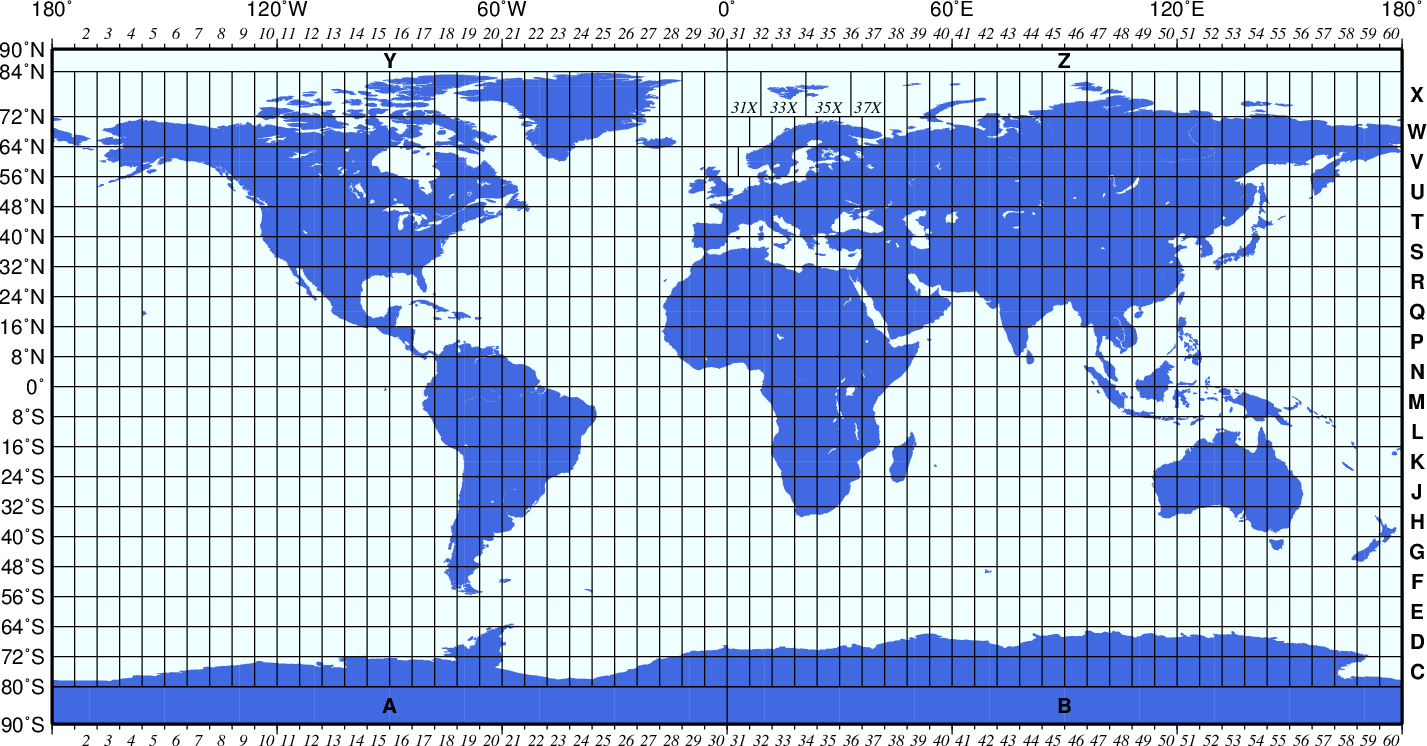
Our tool covers all 60 UTM zones globally and is fully interactive and mobile-friendly.
What Is a UTM Zone?
The Universal Transverse Mercator (UTM) coordinate system divides the world into 60 zones, each spanning 6° of longitude, to produce accurate planar coordinates from geographic latitude and longitude. It’s widely used in GIS, mapping, surveying, and navigation because it simplifies distance and area calculations compared to geographic coordinates.
Why This Tool Is Useful
- Accurate Global Coverage – Works for any point on Earth across all 60 UTM zones.
- EPSG Code Output – Ready for ArcGIS, QGIS, AutoCAD, GPS tools, and spatial workflows.
- Free & No Login Needed – Quick results with zero signup barriers.
- Mobile‑Optimized – Fully responsive on smartphones and tablets.
What You’ll Get
When you find your UTM zone, the tool returns all essential projection details you need for mapping and geospatial analysis:
- Zone number (1–60) and hemisphere
- EPSG code for your coordinate reference system
- Central meridian longitude
- False easting & northing values
- Scale factor at the central meridian
Frequently Asked Questions (FAQ)
What is a UTM zone?
A UTM zone is a vertical strip of Earth used in the Universal Transverse Mercator projection to convert geographic coordinates (latitude/longitude) to flat x/y coordinates in meters for precise mapping.
What is an EPSG code?
An EPSG code is a numeric identifier for spatial reference systems (e.g., EPSG:32633 for WGS 84 / UTM Zone 33N), widely used in GIS software.
Can I use this tool offline?
The tool requires an internet connection to load the interactive map tiles, but it still functions perfectly on mobile and desktop browsers.
Is the tool free?
Yes – completely free and ready to use with no account required.